Filtering slides a small kernel over an image and replaces each pixel with a weighted sum of its neighbourhood. A Gaussian kernel gives a smooth blur and is the standard low-pass filter before downsampling (Aliasing and Downsampling).
Gaussian Kernel
centered on the kernel’s middle, which is index along each axis. For a 13 x 13 kernel the center is index 6.
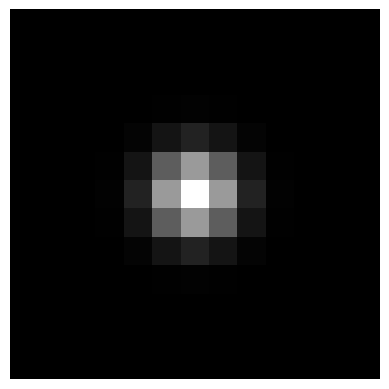
A 13 x 13 Gaussian with sigma = 1, scaled to 0-255 for display. About 98% of the weight sits in the middle 5 x 5.
Normalize to sum 1
Divide by the sum so the weights add to 1. This preserves average brightness. If the sum is , every output pixel is multiplied by , so the image gets brighter (possibly saturating) or darker.
For the sampled kernel already sums to about 1. Normalization matters when the kernel is truncated (large in a fixed window) or is very small.
Kernel size
About holds roughly 99.7% of the weight per axis, so a good size is
For a 7 x 7 kernel is enough, so a fixed 13 x 13 is more than needed. A fixed 13 would truncate a large (for example needs 19).
The sigma trade-off
| Larger | Smaller | |
|---|---|---|
| Blur | More, removes more high frequencies | Less |
| Aliasing and noise | Suppressed | May remain if too little is removed before downsampling |
| Fine detail | Lost, and matching needs detail | Kept |
For downsampling by a factor the rule of thumb is (Aliasing and Downsampling). The kernel size should scale with , as above.
Filtering With Zero-Padding
A direct filter_image implementation pads the image with zeros by rows and columns, then for each position multiplies the window and kernel element-wise and sums, which is a dot product of the window and the kernel. Code: Template Matching Snippets.
- Border darkening: zero-padding averages fake zeros into border pixels, so edges get darker. It matters little when the objects of interest sit away from the image borders.
- Correlation vs. convolution: true convolution flips the kernel. Multiplying the window and kernel directly, as above, is cross-correlation. For a symmetric kernel such as a Gaussian the two are identical.
- Cost: a naive loop is . A 2D Gaussian is separable: apply it as two 1D passes (rows, then columns), which cuts the per-pixel cost from to .
Box (Mean) Filter
The simplest smoothing kernel gives every weight in a window the same value, . Each output pixel is the plain average of its neighbourhood.
| Box filter | Gaussian | |
|---|---|---|
| Weights | Equal inside the window, zero outside | Fall off smoothly with distance |
| Cost | Very cheap, and constant time with Integral Images | A bit more |
| Frequency response | Ripples with negative side lobes, so some high frequencies leak through | Smooth, no leakage |
| Result | Blockier blur | Natural, rotation-symmetric blur |
Always use an odd kernel size. An even-sized kernel has no centre pixel, so the output is shifted by half a pixel, and “same size” loops that pad by come out one row and column short.
Zero-Mean Kernels vs. the Gaussian
Two kinds of kernels behave very differently on flat regions:
| Kernel | Weights sum to | On a flat region | Use |
|---|---|---|---|
| Gaussian | 1 | Returns the same brightness | Smoothing, low-pass |
| Derivative, Laplacian, difference of Gaussians | 0 (zero-mean) | Gives zero response | Responds only to changes: edges and texture |
Do not confuse this with the zero-mean patch idea in Template Matching, where each window and template have their own mean subtracted before comparison.
A Gaussian is also a linear filter, so it smears outliers into their neighbours. For salt-and-pepper noise the non-linear Median Filter is the better tool.
Related: Computer Vision MOC, Aliasing and Downsampling, Multi-Scale Template Matching, Image Pyramids