To a computer an image is an array of numbers. Almost every computer vision algorithm starts by reading pixels out of that array, so the conventions below (shape, order of indices, data type, copies) are worth getting exactly right.
Pixels, Channels and Data Types
| Image kind | Array shape | Meaning |
|---|---|---|
| Grayscale | (H, W) | One intensity per pixel |
| Colour | (H, W, 3) | Three channels per pixel, usually red, green, blue |
| Colour with transparency | (H, W, 4) | Adds an alpha channel |
- Data type: 8-bit images use
uint8with values 0 to 255 (0 is black, 255 is white). Floating-point images usually use 0.0 to 1.0. Mixing the two ranges is a common source of washed-out or black displays. - Channel order: OpenCV reads colour images as BGR, while Matplotlib and most image libraries expect RGB. Convert before displaying, or reds and blues swap.
- Resolution is the number of pixels,
H x W. Fewer pixels mean less detail (Aliasing and Downsampling).
Rows, Columns and (x, y)
Arrays are indexed img[row, column], so the first index is vertical. Image coordinates are written (x, y), where x is the column and y is the row, with the origin at the top-left and y growing downward. The two conventions point in opposite orders, which is the classic source of transposed results. Pick one meaning and stay consistent: this vault reports match positions and corners as (x, y) = (column, row).
Slicing
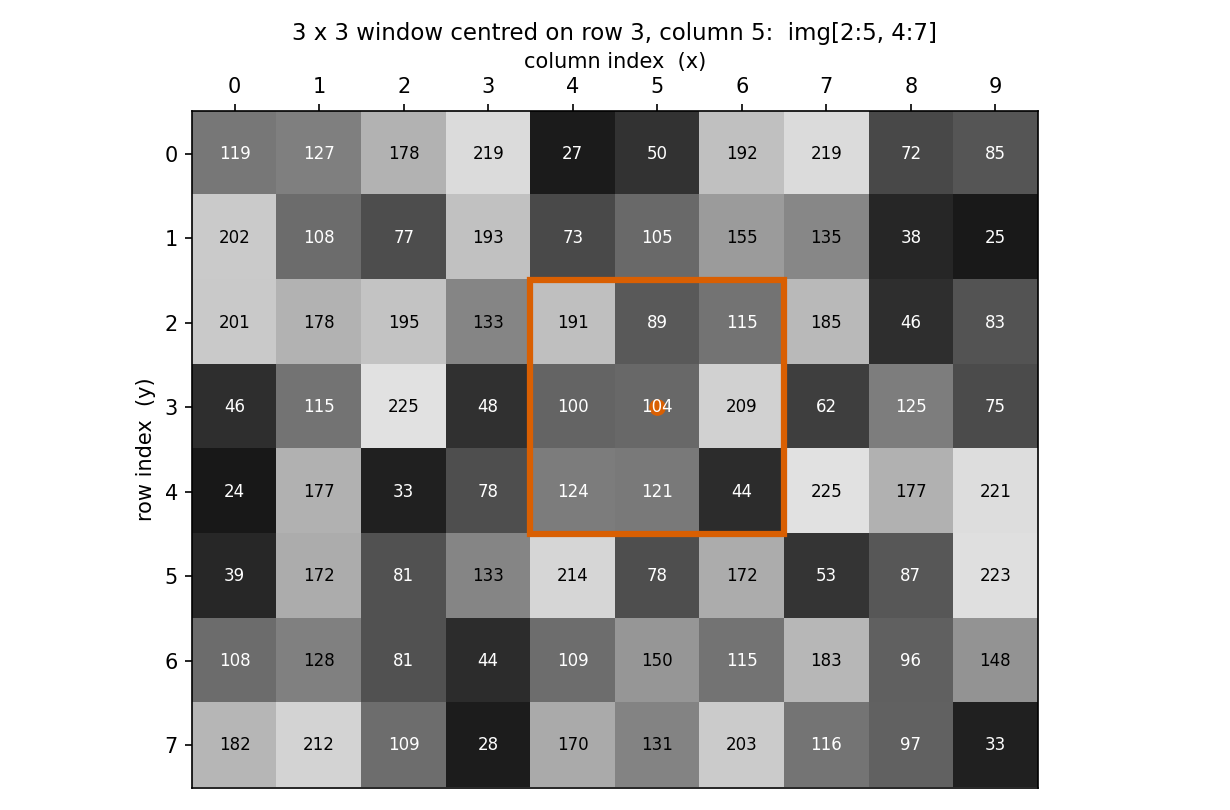
- A slice
img[r0:r1, c0:c1]is half-open: it includesr0andc0but excludesr1andc1, and has shape(r1 - r0, c1 - c0). - A
3 x 3window centred on rowr, columncisimg[r-1:r+2, c-1:c+2]. For example, centred on row 31, column 65 it isimg[30:33, 64:67]. - Negative indices count from the end, so the bottom-left
200 x 200corner isimg[-200:, 0:200]and the top-right corner isimg[0:200, -200:]. - Leaving a bound blank means “to the edge”:
img[:, :100]is the left 100 columns. - For colour images add a channel index:
img[r, c, 0]is the first channel of one pixel, andimg[:, :, 1]is the whole second channel.
Views vs. Copies
A slice is a view onto the original data, not a copy. Writing into it also changes the original:
crop = img[20:140, 20:140]
crop[:] = 0                      # blacks out that region of img as well

safe = np.array(img)             # or img.copy(): an independent copy
safe[20:140, 20:140] = 0         # img is untouched
Plain assignment (b = a) does not copy either; both names point to the same array.
Loops vs. Vectorized Code
A pixel-by-pixel Python loop is easy to read but slow, since each iteration runs in the interpreter. NumPy can apply an operation to the whole array, or to a boolean mask, in compiled code. Pixel-Level Operations shows both versions of common tasks. Sliding-window algorithms such as Template Matching and Cross-Correlation and Convolution are still often written with loops first for clarity and then optimized.
Related: Computer Vision MOC, Pixel-Level Operations, Image Borders and Padding, Image Basics Snippets