Pixel-level (point) operations compute each output pixel from the same pixel in the input, with no neighbours involved. They are the simplest image operations and the building blocks of segmentation, masking and blending. Neighbourhood operations, which also look at surrounding pixels, are covered in Cross-Correlation and Convolution.
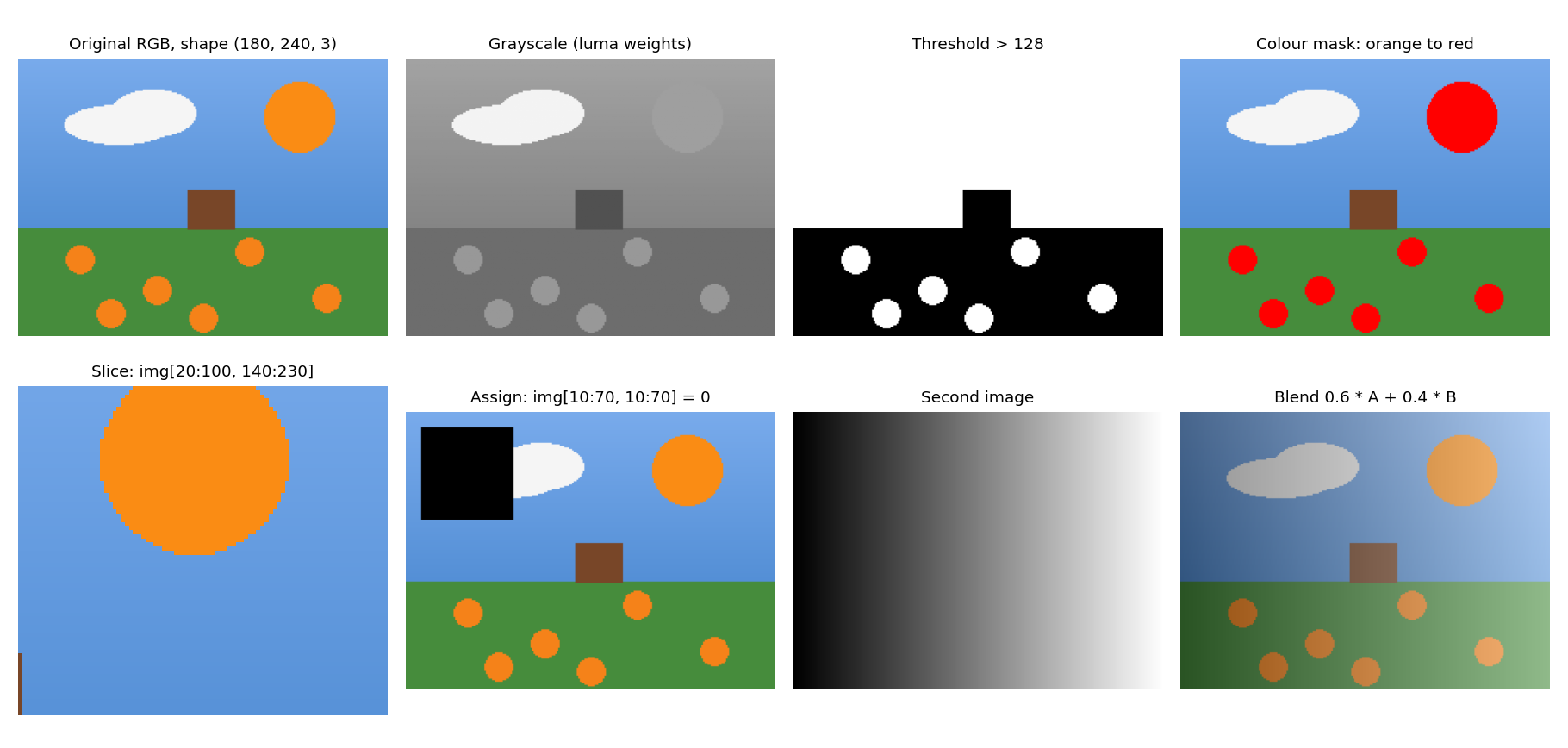
A synthetic image run through the operations below.
Grayscale Conversion
A colour pixel becomes a single intensity with a weighted sum of its channels. The weights follow human sensitivity, which is highest for green:
These are the ITU-R BT.601 “luma” weights, used by most libraries (OpenCV’s COLOR_BGR2GRAY among them). HDTV images use BT.709 weights (). A plain average of the channels is simpler but makes saturated greens look too dark.
Thresholding
Binarization maps each pixel to one of two values depending on a threshold :
out = np.zeros_like(gray)
out[gray > 128] = 255            # vectorized; replaces a double for-loop
It separates bright objects from a dark background (or the reverse), but a single global fails when lighting varies across the image. Adaptive thresholds, computed per neighbourhood, and Otsu’s method, which picks from the histogram, are the usual fixes.
Colour Masking
A mask is a boolean array marking pixels that satisfy a condition. It selects the pixels to modify:
mask = (img[..., 0] > 200) & (img[..., 1] > 100) & (img[..., 2] > 50)
img[mask] = [255, 0, 0]          # paint every selected pixel red
RGB thresholds are crude, because the red, green and blue values all change with brightness. A box such as “R > 200, G > 100, B > 50” also matches yellows, light skin tones and near-whites, so it paints far more than “orange”. More reliable colour selection converts to HSV (hue, saturation, value) and thresholds the hue, which describes the colour independently of how bright it is.
Blending Images
Alpha blending mixes two images of the same size:
- Crop to a common size first (for example
h = min(hA, hB),w = min(wA, wB)), since arrays must have the same shape. - Multiplying by a float produces float values, so cast back with
.astype(np.uint8). - Features that do not line up (faces, say) look ghosted. Aligning the images first is a registration problem, not a blending one.
The uint8 Overflow Trap
uint8 arithmetic wraps around instead of saturating:
np.uint8(200) + np.uint8(100) # 44, not 300 (wrapped modulo 256)Convert to float (or a wider integer type) before adding, subtracting or multiplying images, then clip to with np.clip and convert back. The same trap makes a - b wrap to large values when b > a, which corrupts difference images and SAD costs (Template Matching).
Mean (Box) Smoothing
Replacing each pixel with the average of its window is a neighbourhood operation, but it is often the first filter tried. It is the box filter described in Gaussian Filtering and Convolution, and what happens at the image border depends on the policy in Image Borders and Padding.
Related: Computer Vision MOC, Image Representation and Indexing, Image Basics Snippets, Image Noise