A homography (projective transformation) is the most general 2D mapping that keeps straight lines straight. It describes how a flat surface looks when photographed from different viewpoints, and also how two images of any scene relate when the camera only rotates about its centre. It extends the affine family from Image Warping by adding perspective foreshortening: parallel lines can converge, and far things look smaller.
Definition
A homography is a matrix acting on homogeneous coordinates:
so the output position is :
- The division by is what makes it perspective. It is not a linear map of .
- is only defined up to scale (multiplying all entries by a constant gives the same mapping), so it has 8 degrees of freedom, and one entry, usually , is fixed to 1.
- If , the denominator is constant and reduces to an affine map.
- Preserves: straight lines, and incidence (points on a line stay on a line). Does not preserve: parallelism, lengths, angles or length ratios.
Estimating a Homography
Each correspondence gives two linear equations in the entries of . With 8 unknowns, 4 point pairs (no three collinear) determine exactly. This is the Direct Linear Transform (DLT).
Rearranging and the matching equation for gives, for each pair, two rows of a matrix :
where is the 9 entries of stacked. Stack all pairs into one matrix and solve with : is the right singular vector with the smallest singular value of (the SVD), equivalently the eigenvector of with the smallest eigenvalue, the same device as in Least-Squares Line Fitting. Then reshape and divide by .
- More than 4 pairs are solved in the least-squares sense.
- Normalize the coordinates (centre them, scale to about unit size) before building for numerical stability.
- Outliers: real correspondences from feature matching contain wrong pairs, so the 4-point solve is wrapped in RANSAC. This is how panoramas are stitched.
Using a Homography: Rectification
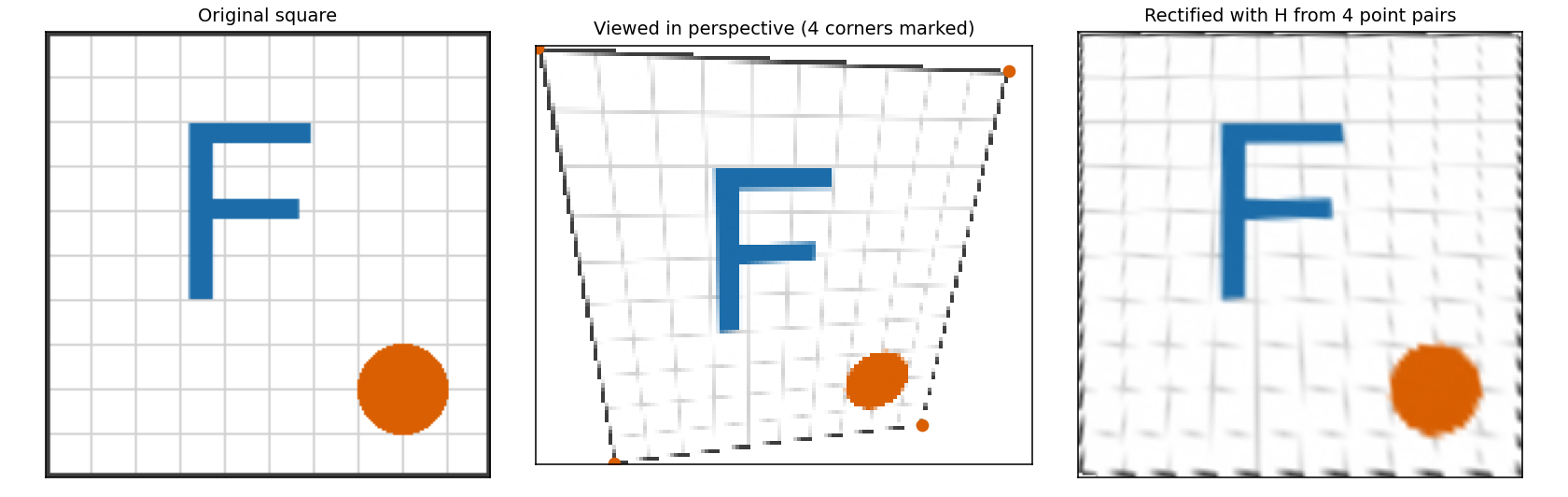
Left: a flat square. Middle: the same square seen from an oblique view, with its four corners marked. Right: the view undone with a homography estimated from just those 4 point pairs. The result is blurrier because the pixels were resampled twice, and the original detail is gone.
Typical uses:
| Use | How |
|---|---|
| Document or whiteboard rectification | Mark the 4 corners of the page and map them to a rectangle |
| Panoramas | Warp every photo into the frame of a reference image with a homography estimated from feature matches |
| Augmented reality | Map a flat marker or poster onto its detected quadrilateral |
| Plane-based tracking and calibration | Track a planar target between frames |
Warping an image with follows the same inverse-mapping recipe as any other warp: apply to each output pixel and interpolate (Image Warping, Image Interpolation).
When a Homography Is Exact
A homography relates two views of an image exactly in two cases:
- The scene is a plane (a wall, a floor, a page, a distant ground).
- The camera only rotates around its optical centre, with no translation. Then any scene, however deep, gives images related by a homography, which is why hand-held panoramas work when you stand still and turn.
If the camera also moves through a 3D scene with depth, a single homography fits only parts of it. A fundamental matrix is the general relation then.
Code: Image Warping Snippets.
Sources: Foundations of Computer Vision, ch. 41: Homographies, which covers 8 degrees of freedom, the DLT, planar scenes, pure rotation, panoramas and RANSAC; Homography (computer vision), Wikipedia; Hartley and Zisserman, Multiple View Geometry in Computer Vision, DLT algorithm. The recovered matrix in the figure matched the true one to about in my test.
Related: Computer Vision MOC, Image Warping, Cylindrical Warping, RANSAC, Image Warping Snippets