Image warping moves the pixels of an image according to a geometric transformation: shifting, rotating, scaling, shearing or bending it. It is the geometric counterpart of Pixel-Level Operations, which change pixel values but leave positions alone. Warping changes where pixels are, and it is the basis of image alignment, panoramas, document rectification and augmented reality.
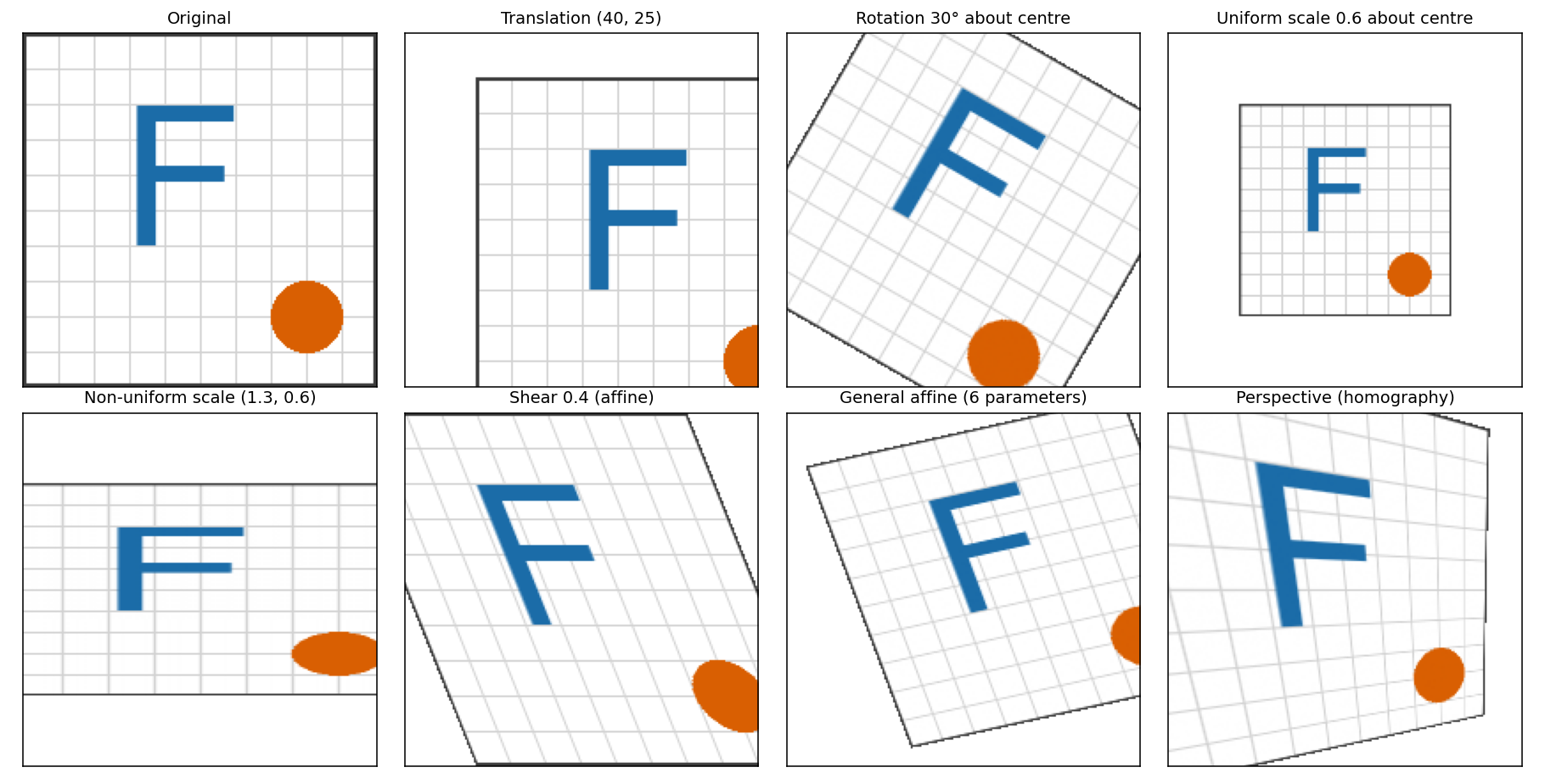
One test image under each transformation covered below. Straight grid lines stay straight in all of them, but only some keep parallel lines parallel.
Homogeneous Coordinates
A 2D point is written as the 3-vector . This lets every transformation below, including translation, be a single matrix multiplication:
For all transformations except the perspective one, and the division does nothing. Chains of transformations become matrix products, and an inverse transformation is the matrix inverse.
The Basic Transformations
| Transformation | Matrix | Parameters | What it does |
|---|---|---|---|
| Translation | Shifts every pixel by the same amount | ||
| Rotation by | Turns the image about the origin | ||
| Uniform scaling | Enlarges or shrinks, keeping the shape | ||
| Non-uniform scaling | Stretches one axis more than the other and changes the aspect ratio | ||
| Shear (horizontal) | Slides rows sideways in proportion to their height |
Notes:
- With the image axis pointing down, a positive angle looks like a clockwise turn on screen.
- A negative scale factor mirrors the image.
- Rotation and scaling act about the origin, which is the top-left corner of an image. To turn or scale about the centre , shift it to the origin, transform, and shift back: .
- Order matters. Matrices apply right to left, so scales first, then rotates, then translates. Rotating then translating gives a different result from translating then rotating, because matrix multiplication is not commutative.
Affine Transformations
An affine transformation is any combination of the above:
It has 6 degrees of freedom, so 3 non-collinear point correspondences (3 pairs give 6 equations) determine it exactly, and more pairs are solved by least squares.
- Preserves: straight lines, parallelism, and ratios of lengths along a line (the midpoint stays the midpoint).
- Does not preserve: lengths or angles, in general. A square becomes a parallelogram.
The Hierarchy of 2D Transformations
Each class contains the ones above it, and each one preserves less:
| Class | Degrees of freedom | Preserves |
|---|---|---|
| Translation | 2 | Everything except position (orientation, lengths, angles) |
| Rigid (rotation + translation) | 3 | Lengths and angles |
| Similarity (adds uniform scale) | 4 | Angles and length ratios |
| Affine | 6 | Parallel lines and ratios along lines |
| Projective (homography) | 8 | Straight lines only: see Homographies and Perspective Warping |
Cylindrical warping is not in this table, because it is a non-linear mapping and cannot be written as a matrix: see Cylindrical Warping.
Forward vs. Inverse Warping
There are two ways to apply a transformation to an image:
| Forward warping | Inverse warping | |
|---|---|---|
| Loop over | Source pixels | Output pixels |
| For each | Compute where it lands: | Compute where it came from: |
| Problem | Output holes and overlaps, because landing positions are not integers | Source position is not an integer, so it needs interpolation |
| Verdict | Rarely used for images | Standard |
flowchart LR
    A["Output pixel (x', y')"] --> B["Apply M^-1 to get source position (x, y)"]
    B --> C{Inside source image?}
    C -->|yes| D["Interpolate the nearby source pixels"]
    C -->|no| E["Fill value (e.g. black)"]
    D --> F[Write output pixel]
    E --> F
- Interpolation: the source position is fractional, so the value is blended from its neighbours (Image Interpolation). Nearest neighbour is blocky, bilinear is the usual compromise.
- Output size: transform the four corners of the source to find the bounding box of the result, and add a translation so nothing lands at negative coordinates.
- Shrinking: a large downscale needs a low-pass filter first, otherwise aliasing appears (Aliasing and Downsampling).
- Repeated warps: every warp resamples and slightly blurs the image, so compose the matrices first and warp once from the original.
Code: Image Warping Snippets.
Sources: Torralba, Isola and Freeman, Foundations of Computer Vision, ch. 38 (homogeneous coordinates and the transformation hierarchy), which also describes forward mapping’s holes and artifacts versus backward mapping; Affine transformation (Wikipedia); Szeliski, Computer Vision: Algorithms and Applications, chapters on image transformations. The figure and the parameter counts were checked with my own implementation.
Related: Computer Vision MOC, Homographies and Perspective Warping, Cylindrical Warping, Image Interpolation, Image Warping Snippets